Web search and tools
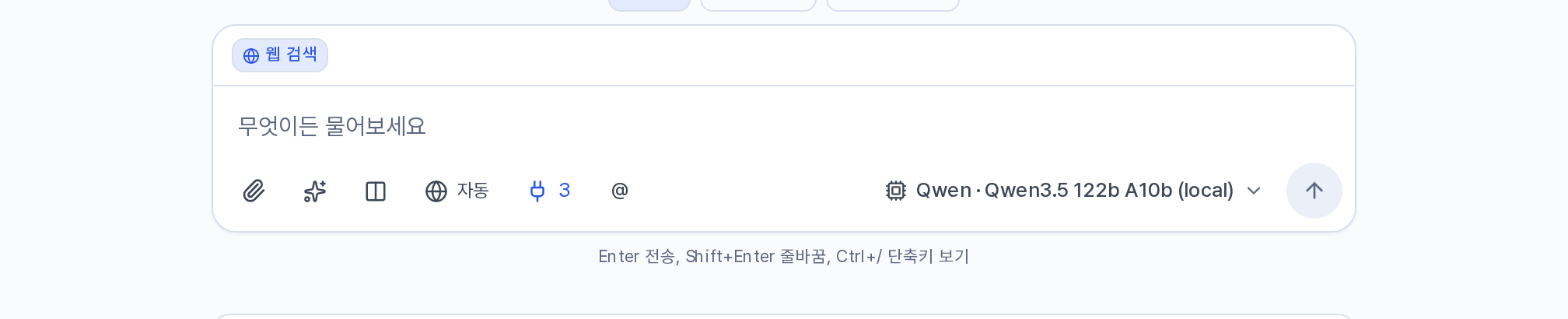
Use the 🌐 button in the composer to switch the web search mode. Each press cycles through Auto → On → Off. The setting applies to that request only, and it resets to Auto in a new conversation.
| Mode | What it does |
|---|---|
| Auto | Searches when you ask about information that changes over time, such as news, prices, schedules, latest versions, and weather. Otherwise it searches only when the model judges it necessary. |
| On | Always performs a search for that request. |
| Off | Does not search unless you ask explicitly, with wording such as "search for" or "look it up". |
When a search runs, the answer shows numbers in the form [n] and a source list. One request performs at most three searches and reads at most six pages. Weather uses a dedicated tool instead of search. If you select a strict-local model or run a model comparison, the button is disabled and shows No web search.
Requests about current information need a search. "Exchange rate trends this quarter" and "Changes in Python 3.14" are examples. Calculation, translation, summarizing an attached text, and fixing code do not need a search. Setting the mode to Off for those makes the answer faster and avoids unnecessary sources.
Tools the model uses
Models that support tool calling, marked 🔧 in the list, use the following tools as the request requires. Their use appears in the processing steps.
| Tool | What it does |
|---|---|
| Web search · Page reading · Weather | Runs searches and reads the body text of the pages it needs. |
| Code execution | Performs calculations, table processing, and chart generation with real code. This path is accurate for arithmetic on large numbers. |
| Arithmetic check | Calculates arithmetic and powers exactly on the server, and compares the result with answer choices or a submitted answer. It needs no extra server, and requests that call for a calculation use it first. |
| Find in files | Searches inside attached files and agent material. |
| Artifacts · Chart creation | Produces the result as a document or a chart in the right panel. |
| Shared notes | Leaves a note for other conversations in the same project to reference. |
| Connectors | External tools that you installed. Connectors |
Where the administrator has not connected a search server or a code execution server, those tools are not available.