Sharing
Create a link with the Share button at the top right of the conversation screen.
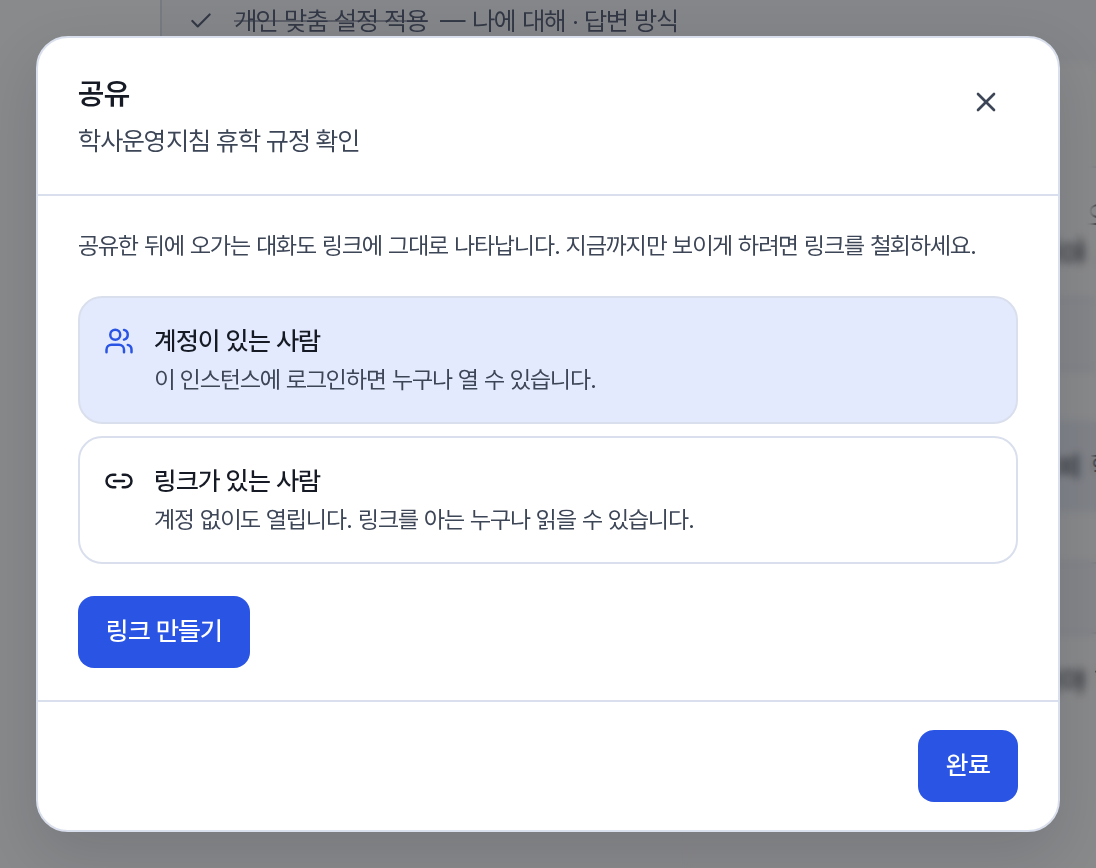
Creating a link
-
Choose who can see it.
Scope Who can view it People with an account Every user signed in to this service. Restrictions by department or team do not apply. People with the link Anyone who knows the link. No account is needed. -
Press Create the link and then Copy.
After creation, the status is shown as Account required or Opens without an account.
What is shared
- The conversation and the outputs generated in it are made public. The output is shown first, and the conversation follows. For some types, a message says that the share screen does not support them yet.
- Project files and memory are not shared. Files attached to the conversation are exposed only to the extent that the answer quotes them.
- Conversation that continues after sharing keeps appearing in the link as well. To make only part of it public up to a certain point, revoke the link and create a new one.
View history and revocation
In the same window you can check the viewer (name and email, or "visitor without an account"), the browser, the region, and the number of views. Repeat views within one hour are counted as one. When you run Revoke the link, the link stops working immediately. The link is also blocked if you delete the conversation.