Sharing a volume
Share on a volume you own gives someone else access to it.
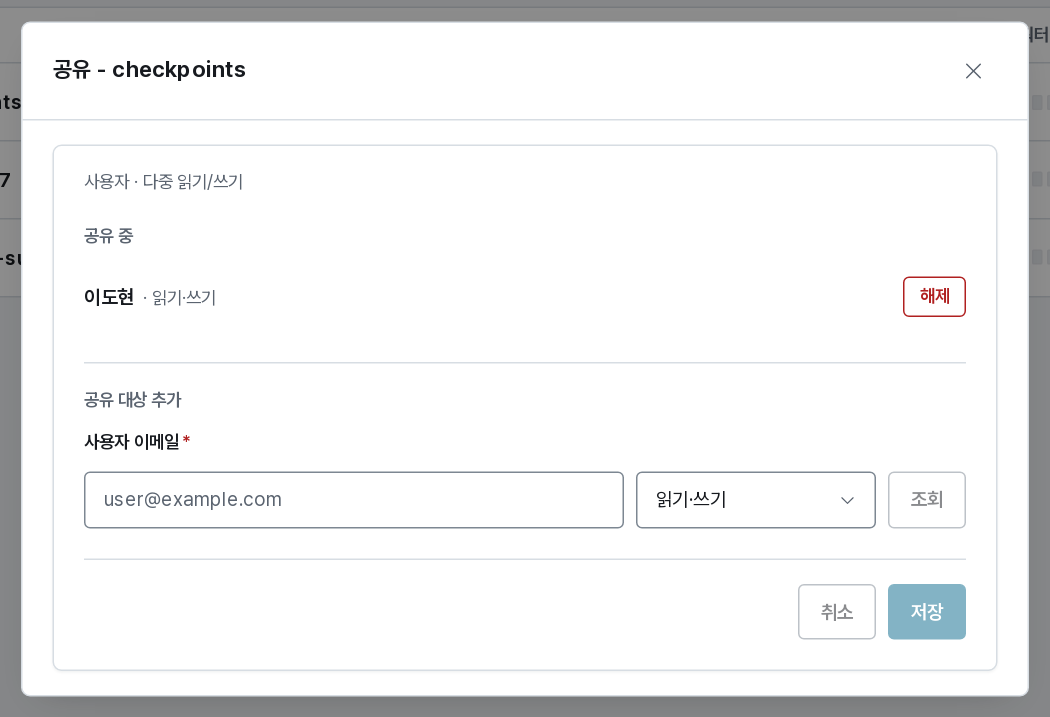
Granting access
Type the person's email address, choose the role, and save:
| Role | They may |
|---|---|
| read-only | Mount it read-only in their sessions |
| read/write | Mount it either way, and change the files |
A grantee can never delete the volume, change its quota, or re-share it. Those stay with you.
The dialog lists everyone the volume is currently shared with, each with Revoke. Revoking takes effect immediately: sessions already running keep their mount until they end, but no new session can mount it.
A shared volume carries a shared tag in your list, so it is visible at a glance which of your volumes other people depend on.
Group and everyone volumes
Volumes created with the group or everyone scope are shared by construction — every member of the group (or every user) can mount them without an invitation, at the volume's own access mode. There is nothing to grant, and nothing to revoke short of changing the volume.
Volumes shared with you
They appear in your list with the scope shared · <owner>, and the wizard offers them like your own. What differs:
- you cannot change the quota, lock, or delete them;
- if they were shared read-only, the session mount is pinned to read-only;
- they count against the owner's storage quota, not yours.
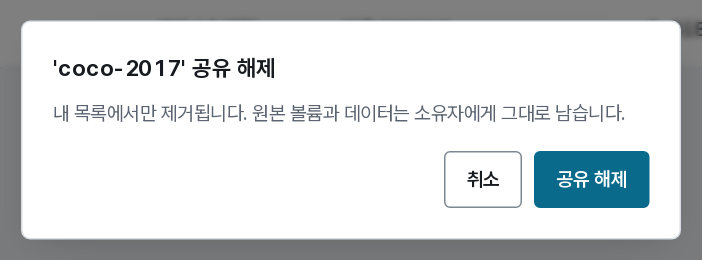
Leave share removes the volume from your list only. The volume and its data stay with the owner — this is the polite way to tidy a list, not a way to delete someone's data. Ask the owner to share it again if you need it back.
Everyone you share a read/write volume with can overwrite the files in it. For a dataset that must not change, share it read-only — or create it read-only in the first place.