Connecting to a session
A running session is reachable from the browser. There is no SSH and no client to install: Connect on the session detail page issues links into the container.
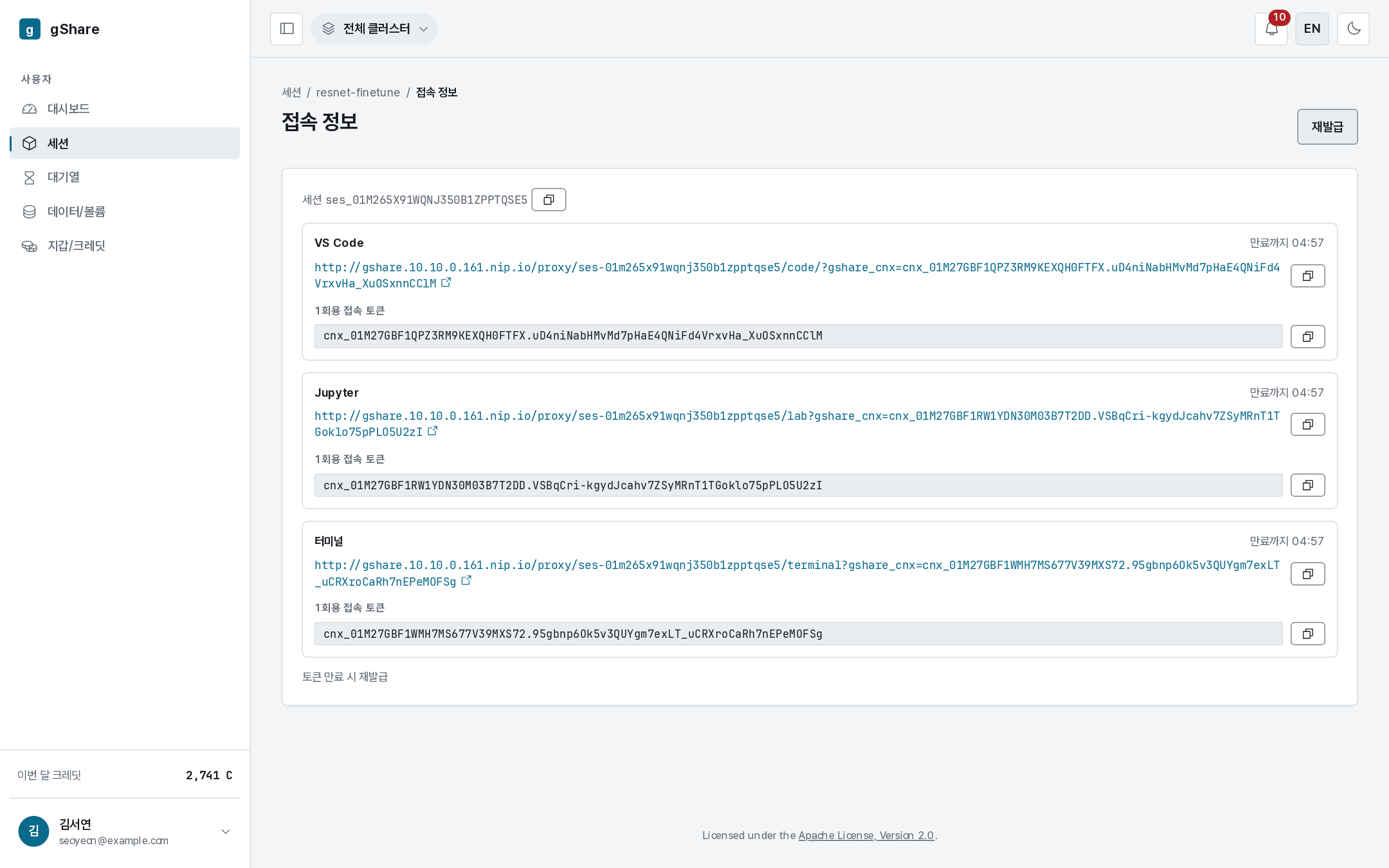
The three ways in
| Link | What it opens |
|---|---|
| code | code-server — VS Code in the browser, with the session's filesystem and terminal |
| lab | JupyterLab — notebooks, a file browser, and a terminal |
| terminal | ttyd — a plain shell, the lightest of the three |
All three run inside the session's container, so they see the same files, the same GPU, and the same mounted volumes. Open two at once if you like.
Single-use links
Each link carries a one-time token with a short expiry, shown next to it as a countdown. The first request redeems the token for a short-lived cookie and the link is then spent — which is why a link that has been sat on for a while, or forwarded to someone else, does not work.
Reissue mints a fresh set. Do that rather than reloading an expired link.
The panel also shows the raw URL and the token with copy buttons, for pasting into a ticket or a script that has to reach the session.
Anyone holding an unredeemed link can enter your session and your data. Treat it like a password: do not paste it into a shared channel.
What you can do inside
- Run notebooks and scripts against the GPU slice the session holds.
- Read and write your mounted volumes at the paths you chose.
- Install packages into the container (
pip install …) — they live on the scratch disk and disappear when the session ends. Anything that must survive belongs on a volume, or in an image. apt installonly works when the session was created as privileged.
When Connect is not offered
The button is disabled unless the session is running:
- Pending — it is still waiting for capacity or starting. Wait, or check the queue.
- Paused — the container is gone. Resume first; see Managing a session.
- Terminated — the session is over. Create a new one.
If a link returns an error while the session is running, reissue it. If that also fails, the session's event log will say what happened to the container.